ipv4-configuration
• To participate in a network, you need an IP address and a netmask. However, with only those 2, you cannot go beyond the local network.
• To use the internet, you need a default gateway — a router in your own network that forwards your packets onto the internet. A router brings you to the entire internet, but it does so only based on destination IP addresses.
• We are, however, used to using hostname.domainname combinations in Uniform Resource Locators, URLs. Such a hostname is for example www.google.be in the domain google.be.
• To use hostnames on the internet, we need a DNS server — the IP address of at least one server that translates domain names and hostnames into IP addresses.
A complete ip-configuration needs:
- ip-address
- netmask
- default gateway
- dns-server(s)
example:c:\> ipconfig Ethernet adapter Local Area Connection 2: Description . . . . . . . . . . . : Intel(R) PRO/1000 MT Desktop Adapter Physical Address. . . . . . . . . : 08-00-27-94-CD-ED IPv4 Address. . . . . . . . . . . : 10.0.2.15(Preferred) Subnet Mask . . . . . . . . . . . : 255.255.255.0 Default Gateway . . . . . . . . . : 10.0.2.2 DNS Servers . . . . . . . . . . . : 8.8.8.8 195.130.131.1static or dynamic
On the internet you'll find clients and servers:
• Servers need a fixed IP configuration, because you must be able to reach them from anywhere. We give them a static configuration; in other words, we often set their configuration manually. Network printers and routers also need fixed IP addresses.
• Clients these days are often mobile and end up in different networks. They need IP configurations that travel with them dynamically as they move between networks. they use DHCP services for their ip-configurations.
A static config in a linux-server looks as follows:
(btw.: a linux server gets its ip-config from a text-based file:/etc/network/interfaces
$ cat /etc/network/interfaces# The loopback network interface auto lo iface lo inet loopback # your first network adapter auto eth0 iface eth0 inet static address 94.153.21.208 netmask 255.255.255.0 gateway 94.153.21.254 dns-nameservers 8.8.8.8 8.8.4.4
A dynamic configuration from a windows11-machine looks like the following: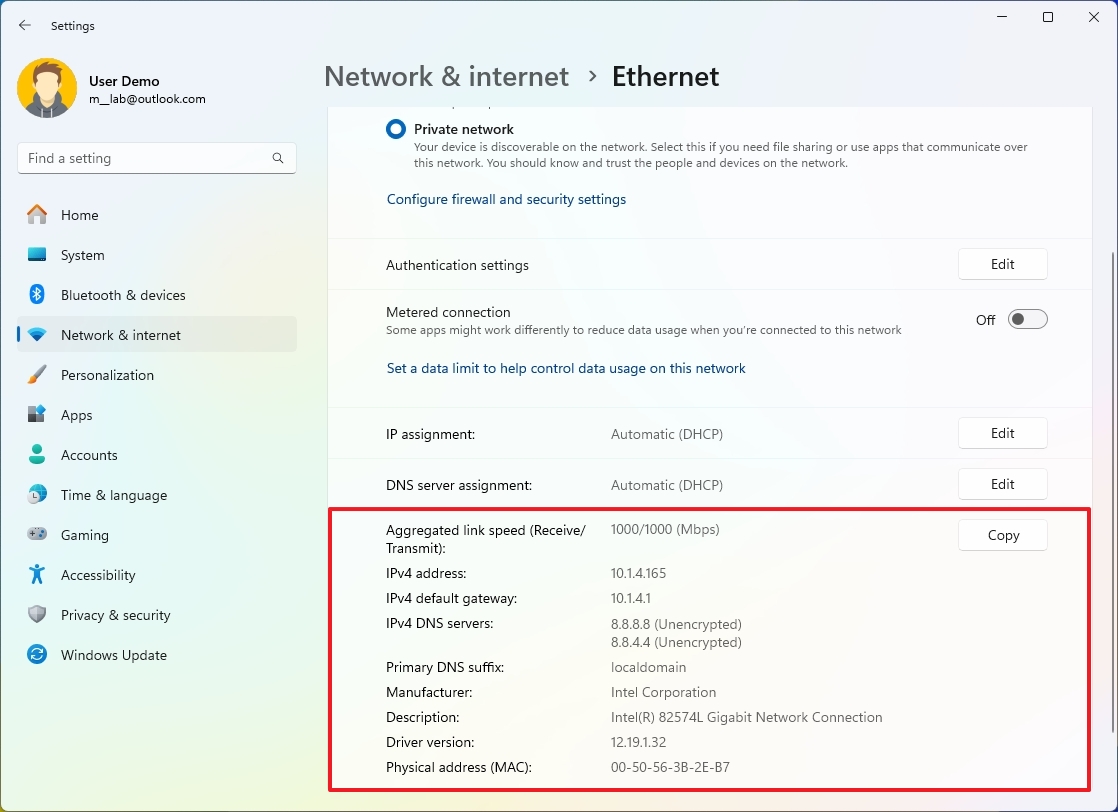
The configuration of the Windows PC above is provided by a DHCP server.
Wherever the client ends up, a DHCP server is available.
And now the client will always be able to access the internet wherever it is allowed.
It will always have a working IP configuration, although that configuration will be different in each location.